
Synthesia
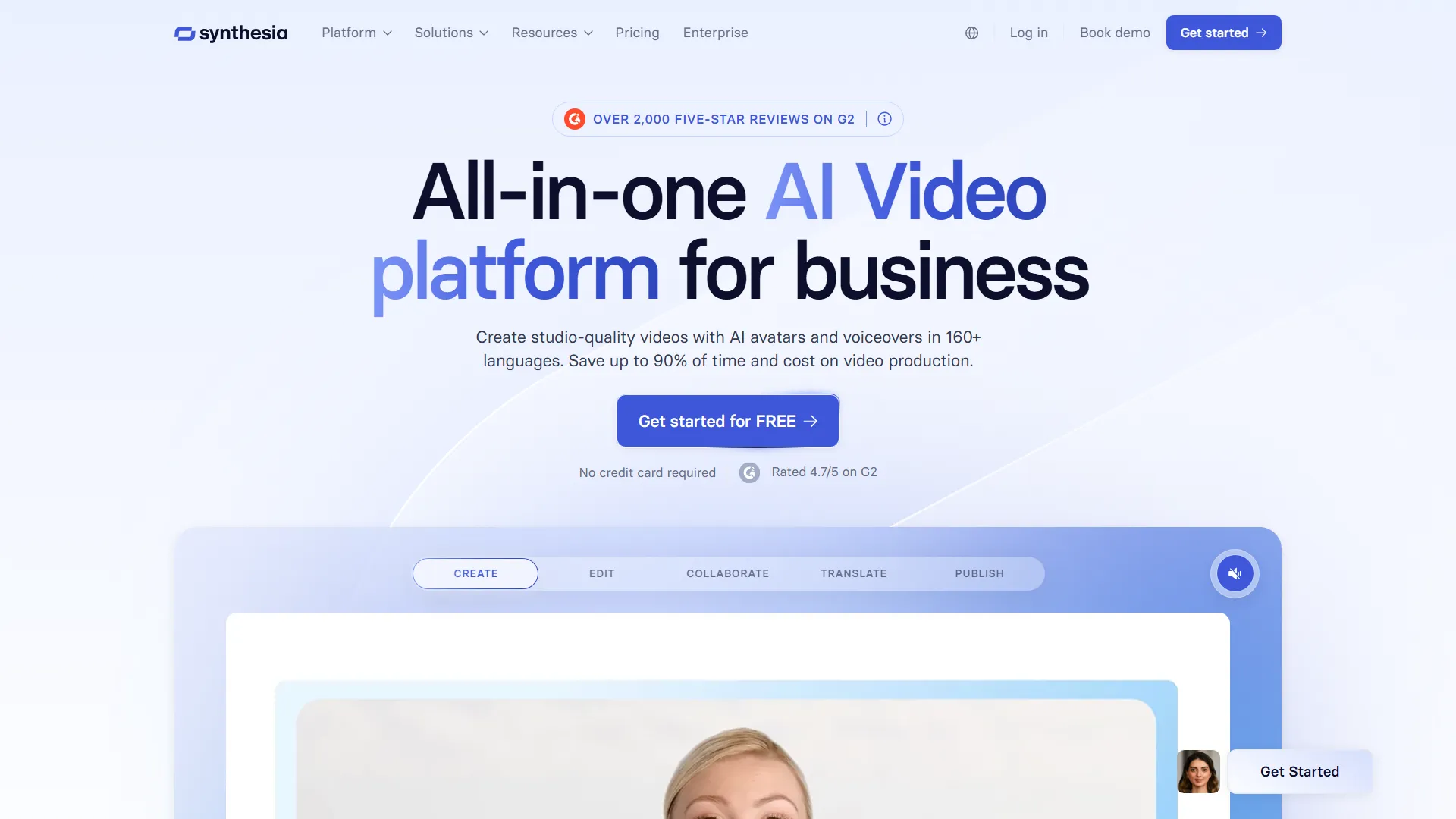
Synthesia is an AI-powered video creation platform that enables users to generate professional-grade videos with realistic digital avatars from text, ideal for corporate communications and training.
How it works and main features
Explore the main features, functionalities and how this AI tool can help you.
Synthesia is an AI-driven video synthesis platform designed to replace traditional video production workflows. By inputting a script, users can select a digital avatar that reads the text, utilizing proprietary neural networks to ensure natural-looking lip movements and gestures. The tool includes built-in editing features, screen recording tools, and asset management for corporate teams. It is best suited for corporate training and development departments, internal communication teams, and content creators who need to produce repetitive instructional videos. Because it eliminates the need for actors, cameras, and lighting, it is particularly effective for teams looking to scale video production across multiple languages without incurring high production costs. However, Synthesia has limitations regarding complex narrative storytelling and highly emotional or nuanced dramatic performance, where a human actor remains superior. It is not suitable for cinematic film production or highly dynamic video projects requiring advanced 3D physics, specialized lighting effects, or intricate human-like movements that the AI model cannot yet simulate. Ultimately, users should choose Synthesia if their primary goal is the high-volume production of informative, text-based videos such as product demos, HR onboarding, or internal memos. It excels in environments where content consistency and rapid iteration are prioritized over the raw creative flexibility found in traditional post-production software like Adobe Premiere Pro.
- Text-to-video script generation in 120+ languages
- Custom AI avatar cloning for brand-specific presenters
- Built-in screen recorder for product walkthroughs
- Library of over 140+ diverse AI avatars
- Collaborative video editing workspace for teams
- AI voice cloning for personalized narration
- Automated closed captioning and subtitle generation
- Integrated stock media assets and background templates
Advantages and disadvantages of the tool
See the main strengths and limitations to decide if this tool is ideal for you.
Pros
- Drastic reduction in production time compared to traditional video filming.
- Ease of scaling content into dozens of different languages.
- Simple updates to video scripts without requiring re-filming.
- High-quality, realistic avatar movements and lip-syncing.
- Centralized asset management for large enterprise teams.
Cons
- AI avatars still lack the nuanced micro-expressions of professional human actors.
- Limited animation capabilities compared to professional video editing suites.
- Strict content moderation policies can restrict creative freedom.
- Initial avatar cloning requires high-quality footage to look authentic.
- Platform is cost-prohibitive for individual creators or hobbyists.
Feedback and user experiences
See the reviews, ratings and opinions of users to understand the real experience with this tool.
John D.
Incredible for internal training videos. We cut our production time by 80%.
G2
Sarah M.
The translation features are a game changer for our global team communication.
G2
Michael B.
Very easy to use, though the avatar gestures can look slightly repetitive over time.
Capterra
Elena R.
High quality video output. Perfect for professional product demos.
Trustpilot
David W.
Solid platform, but make sure you have a clear plan for your avatar assets.
G2

G2
4.7
Capterra
4.6
Trustpilot
4.5
Product Hunt
4.8
Real applications of the tool
Ideas and examples to make the most of the tool's features.
Employee Onboarding
Creating standardized orientation videos that can be easily updated as company policies change.
Multilingual Support
Translating instructional videos into 120+ languages to support global customer bases.
Internal Company News
Replacing written emails with short video updates from leadership using AI avatars.
Product Tutorials
Embedding video demos directly into software documentation to improve user comprehension.
Sales Enablement
Generating personalized video outreach messages for high-value prospects at scale.
Other similar tools
Compare with similar tools and choose the one that best meets your goal.
 Freemium
Reclaim
4.80Reclaim is an AI-powered calendar management tool that automatically schedules tasks, habits, and meetings to optimize work-life balance for busy professionals.
- Productivity
- Life Assistants
 Freemium
Superhuman
4.50Superhuman is a high-performance, keyboard-centric email client designed for professionals and teams who require extreme speed and efficiency in their inbox management.
- Productivity
 Freemium
Notion
4.42Notion is an all-in-one workspace that combines notes, databases, and project management tools, ideal for teams and individuals seeking a customizable information hub.
- Productivity
- Education & Studies
- Files & Spreadsheets
 Freemium
ClickUp
4.25ClickUp is an all-in-one project management platform designed for teams to centralize tasks, documentation, and collaboration within a single workspace.
- Productivity
- Files & Spreadsheets
- AI Chat & Assistant
- Automation
- Text Generators
Tutorials and videos of the tool
Learn how to use the tool with visual content and practical examples.

NEW: Create AI Avatars That Talk, Walk & Act!
Welcome to Synthesia
Introducing Synthesia 2.0
AI Video in 4 Minutes with Synthesia
How are Synthesia AI Avatars created?
Frequently Asked Questions
Everything you need to know about finding and using AI tools
Synthesia offers a limited demo version that allows you to test the platform capabilities before purchasing a subscription.
The Starter plan begins at $22 per month when billed annually.
Yes, you can upload your own voice or use the AI voice cloning feature to create a custom digital double.
Video length limits depend on the specific pricing tier you choose.
Yes, the platform supports over 120 languages and accents through its AI text-to-speech engine.
Synthesia is SOC2 Type II compliant and implements strict data protection measures for all user content.
Yes, completed videos can be downloaded in MP4 format for use in other video editing tools.
Yes, it integrates with several common learning management systems to streamline training content delivery.
Yes, Synthesia offers a service to create a custom high-fidelity digital twin of your likeness.
Generation typically takes a few minutes depending on the video length and complexity.
Latest AI Tools Articles
Everything you need to know about finding and using AI tools